Made withHyperblog
Blog architecture is the system that decides where your blog lives, how its URLs are formed, how topics are grouped, how pages link to one another, and how those choices survive a redesign or migration. A sound architecture gives readers predictable paths and gives search engines consistent signals about page purpose, relationships, and preferred URLs.
For most business blogs, the practical goal is a shallow, durable structure: one clear blog home, descriptive article URLs, a small set of useful categories, contextual internal links, and a migration plan that preserves every important destination. This guide covers that planning layer. For the narrower hosting decision, see Hyperblog's dedicated subfolder versus subdomain guide: https://www.hyperblog.io/blogs/subfolder-vs-subdomain-for-blogs-which-setup-is-better-for-seo-and-ai-discovery/
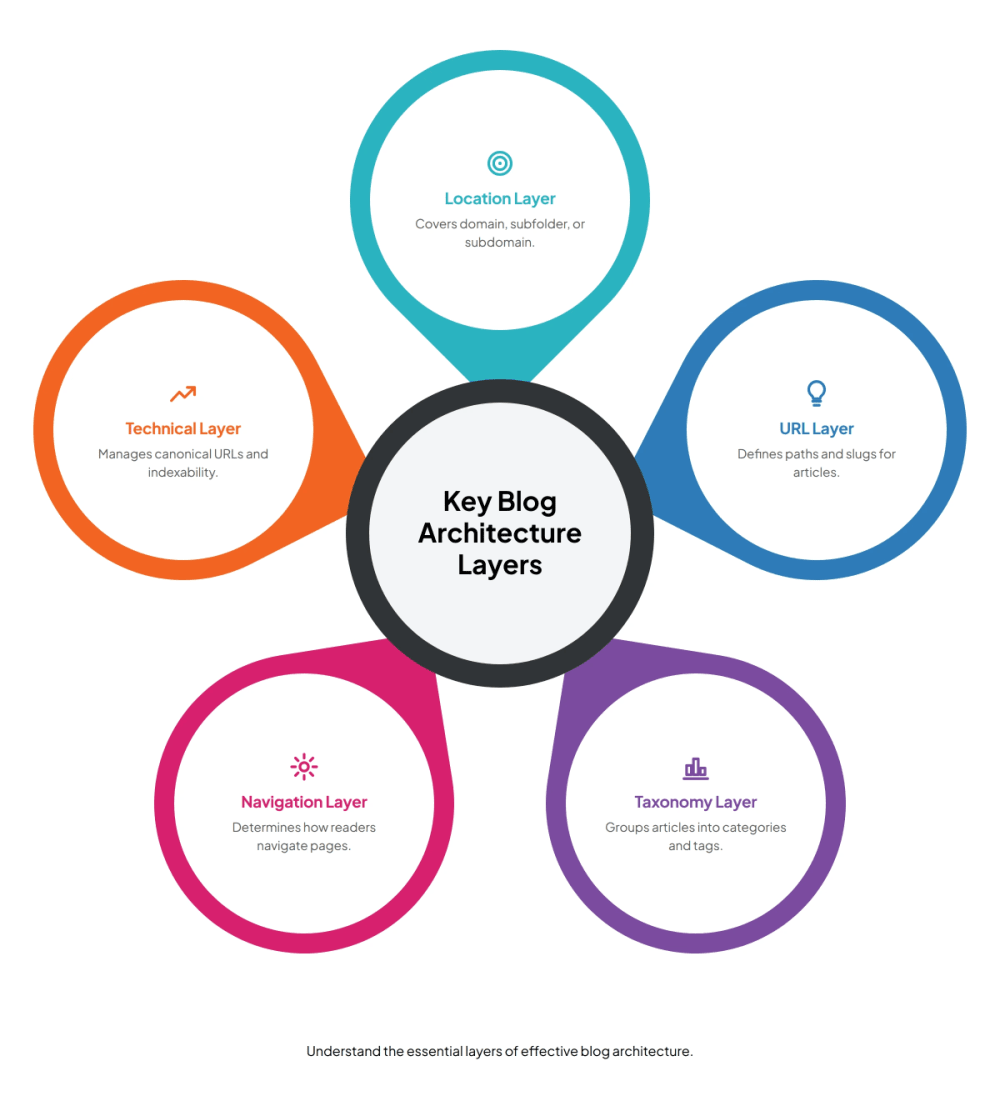
A blog's architecture has five connected layers. The location layer covers the domain, subfolder, or subdomain. The URL layer defines paths and slugs. The taxonomy layer groups articles into categories, tags, and topic clusters. The navigation layer determines how readers and crawlers move between pages. The technical layer manages canonical URLs, redirects, sitemaps, and indexability.
Treat these layers as one system. A clean slug cannot compensate for orphaned articles. A useful category becomes less valuable when it creates thin archive pages. A migration plan fails when redirects are correct but internal links still point to old URLs. Architecture works when every layer supports the same page ownership model.
Before choosing folders or categories, list the page types your site needs. A typical business site has commercial pages for products and features, comparison pages for evaluation, documentation for implementation, and blog articles for education. Each page should have a distinct job and one primary search intent.
This prevents the blog from competing with product pages. A commercial page can own “blogging platform,” while an educational article explains how to design a blog architecture. Shared words do not create a conflict by themselves. A conflict appears when two pages answer the same query with the same format and reader outcome.
Create a simple ownership table with these fields: page type, reader question, primary keyword, target URL, main call to action, and supporting pages. Review it before publishing new articles or changing URLs. That single habit catches duplicate topics earlier than most technical audits.
A blog can live in a subfolder such as example.com/blog/, a subdomain such as blog.example.com, or a separate domain. The right choice depends on your website stack, publishing workflow, governance, and migration cost. Do not treat the location as an isolated ranking switch.
A subfolder often simplifies navigation, analytics, and brand consistency because the blog stays under the main hostname. A subdomain can be practical when the main application cannot serve a blog path or when operational separation matters. A separate domain usually adds the most brand and maintenance overhead, so it needs a strong editorial or organizational reason.
Evaluate the options using four questions:
Hyperblog supports connecting a blog to an existing site as a subfolder or subdomain. Its platform overview explains the workflow and built-in publishing layer: https://www.hyperblog.io/blogging-platform/
A good article URL is readable, lowercase, hyphenated, and unlikely to become inaccurate. Google recommends simple, descriptive URL structures and notes that URL paths are case sensitive. The current guidance is available at https://developers.google.com/search/docs/crawling-indexing/url-structure
Help us understand your challenges with blog architecture.
What challenges do you face in structuring your blog?
Keep the blog path consistent. A pattern such as /blogs/article-slug/ makes page type obvious and keeps editorial URLs together. Avoid dates unless the date is part of the content's lasting identity. Avoid category names in article URLs when categories may change. Moving an article between categories should not require a redirect.
Choose one protocol, hostname, capitalization pattern, and trailing-slash convention. Then apply that form in canonical tags, internal links, sitemaps, and redirects. Variants such as HTTP and HTTPS, www and non-www, or uppercase and lowercase paths can create duplicate discovery and fragmented reporting.
Google describes canonicalization as selecting a representative URL from a group of duplicate or highly similar URLs. Canonical tags are useful signals, but consistent internal links and redirects make the intended version clearer. Review the current explanation at https://developers.google.com/search/docs/crawling-indexing/canonicalization
Categories should represent durable subjects that readers expect to browse. Start with three to seven broad categories, then add one only when several current or planned articles need it. Category names should describe the topic, not an internal team, campaign, or temporary trend.
Tags work best as optional cross-cutting labels. A category might be Technical SEO, while tags identify SEO, Blogs, or Growth. Avoid creating tags for every phrase in an article. Near-duplicate tags create thin archives and make editorial decisions harder.
For each proposed category, ask whether a reader can predict what belongs there, whether at least three useful articles can support it, and whether it overlaps another category. If two labels would contain almost the same posts, keep the clearer one.

Download our essential checklist for creating a successful blog architecture.
Navigation links establish broad routes, while contextual links explain precise relationships between pages. Every important article should receive at least one link from a relevant hub, pillar, commercial page, or established article. New articles should also link back to the page that owns the broader topic.
Use descriptive anchor text that tells readers what the destination covers. Link to the canonical URL directly. Avoid relying on scripts, buttons, or search forms as the only discovery path. Google recommends crawlable links with real destination URLs: https://developers.google.com/search/docs/crawling-indexing/links-crawlable
A practical publishing checklist is simple: link up to the parent topic, across to two or three related articles, and toward one relevant next step. For this guide, the narrow hosting decision belongs in the subfolder-versus-subdomain article, while automatic canonical, schema, and sitemap handling belongs on Hyperblog's technical SEO page: https://www.hyperblog.io/blog-auto-technical-seo/
Architecture choices become real through technical controls. Each indexable article should return a successful status, expose a self-referencing canonical URL, appear in an XML sitemap, and remain reachable through crawlable links. Archive pages should be intentional. Search results, preview environments, parameter variants, and duplicate filters should not become accidental entry points.
Structured data can describe the article, author, organization, and breadcrumbs, but it does not replace visible page structure. Use one H1, clear section headings, and consistent author information. Make the HTML useful even when structured data is ignored.
A managed blogging platform can reduce the operational work around metadata, schema, and sitemap updates. The claims still need to match the product's current capabilities, and teams should verify the live output after implementation.
A migration begins with an inventory, not a new design. Export every live URL, canonical URL, status code, organic landing-page signal, internal link, backlink target, and planned destination. Normalize protocol, hostname, case, and trailing slashes before matching records.
Map each old URL to one final destination with the closest intent. Keep strong URLs unchanged when possible. Use permanent server-side redirects for moved pages, point redirects straight to the final URL, and avoid chains. Update internal links, canonicals, hreflang annotations where relevant, and sitemaps to the new locations.
Google's site-move guidance recommends preparing and testing the new site, building a URL mapping, configuring redirects, and monitoring both old and new URLs. It also recommends changing one major variable at a time when possible. See https://developers.google.com/search/docs/crawling-indexing/site-move-with-url-changes
Expect normal movement while search systems recrawl and process changed URLs. Avoid promising an exact recovery date. Migration outcomes depend on site size, crawl patterns, redirect quality, content changes, and the number of variables changed at once.
Use this sequence for a new blog or redesign. First, define page types and keyword ownership. Second, choose the blog location based on publishing and technical constraints. Third, set one URL convention and preserve it. Fourth, create a small durable taxonomy. Fifth, design hubs and contextual links. Sixth, document canonical, sitemap, and indexability rules. Seventh, prepare a URL mapping before any migration.
Score each decision on reader clarity, editorial effort, technical reliability, and reversibility. The best architecture is rarely the most elaborate one. It is the structure your team can apply consistently across hundreds of publishing decisions.
Hyperblog can provide the managed blog layer while an existing website continues to host product and company pages. Teams can connect the blog through supported domain options and use built-in publishing and technical SEO features instead of maintaining a custom editorial stack. For Next.js teams evaluating that operating model, the product page is https://www.hyperblog.io/nextjs-blog-cms/
The architecture decisions still belong to the site owner. Choose keyword owners, category boundaries, internal-link destinations, and migration mappings before moving content. Then use the platform to execute those decisions consistently.
Blog architecture is the system for a blog’s location, URL patterns, taxonomy, navigation, internal links, canonical signals, and migration rules.
A subfolder often simplifies governance and navigation, while a subdomain can suit technical separation. Choose based on publishing control, integration needs, and migration cost.
Start with a small set of durable categories, often three to seven. Add one only when several current or planned articles need a distinct browseable topic.
Usually avoid category names when categories may change. Stable article URLs reduce redirect work when the taxonomy evolves.
Inventory every URL, map each old page to one final destination, use permanent server-side redirects, update internal links and canonicals, and monitor the move.
Canonical URLs identify the preferred version of duplicate or similar pages. They work best when redirects, internal links, and sitemaps also use that same URL.
A useful blog architecture makes the next article easier to place and the next migration less risky. Keep the hierarchy shallow, URLs stable, categories selective, links intentional, and technical signals consistent. Document ownership before publication and normalize URL variants before every audit.
If your team can explain where a new article belongs, which page owns its main query, how readers will discover it, and what happens if the URL ever changes, the architecture is doing its job.
Subscribe to Our Newsletter
Stay up to date with our latest news and updates.