Made withHyperBlog

A useful blog post cannot attract search traffic if search engines cannot reach it, understand it, or index it. This technical SEO checklist helps marketers and content creators check those foundations without writing code. Work through it in order: remove discovery and indexing blockers first, then improve site structure, performance, and ongoing maintenance.
Verify your site in Google Search Console; a Domain property covers protocols and subdomains but requires DNS access. Ask your domain administrator if needed. Review Page indexing, Sitemaps, Core Web Vitals, and Performance to establish your baseline.
Next, crawl your blog with a tool such as Screaming Frog SEO Spider. Its free version crawls up to 500 URLs. Export status codes, indexability, canonical URLs, titles, and internal links. Include posts, category pages, and pagination. Save the dated export so you can compare results after changes.
Prioritize by scope and impact. An accidental sitewide noindex directive, blocked blog directory, or repeated server errors outrank missing meta descriptions. Next, address broken internal links and incorrect canonicals affecting important posts. Then tackle performance and presentation improvements. Record each issue’s affected URLs, owner, priority, and verification method.
Marketers can usually edit slugs, metadata, image sizes, internal links, and publishing settings. CMS features may automate sitemaps, canonical tags, redirects, and structured data. Server responses, rendering failures, caching, DNS, and template-level defects often need developer support. Confirm which controls your CMS exposes rather than assuming every setting is editable.
Use your crawler and Search Console’s URL Inspection tool to check representative posts. Published pages intended for search should return HTTP 200, allow crawling, and have no noindex directive in their HTML or HTTP headers. Inspect both individual posts and shared templates, where one mistake can affect the entire blog.
Robots.txt controls crawling, not guaranteed removal from search. Blocking a URL can prevent Google from seeing its noindex directive. For deliberate deindexing, allow crawling so the directive can be read; use authentication for private material. Investigate unexpected 404s, soft 404s, and 5xx errors rather than redirecting every failure to the homepage.
Find the XML sitemap in your CMS settings and submit it through Search Console. It should contain preferred, indexable URLs that return 200—not redirects, deleted posts, or tracking variants. Check that new posts appear automatically and last-modified dates reflect meaningful changes. A sitemap supports discovery; it does not guarantee indexing.
Inspect a missing post and compare its indexed status with a live test. Check crawl permission, fetch results, indexing permission, and Google’s selected canonical. Group recurring exclusions in the Page indexing report. “Crawled—currently not indexed” is not automatically a technical error: assess duplication, usefulness, and internal links. Request indexing after meaningful fixes, not repeatedly without changes.
Choose short, descriptive slugs that reflect the topic without unnecessary dates or tracking parameters. Avoid changing established URLs solely for cosmetic reasons. Each distinct, indexable post should normally have a self-referencing canonical pointing to its preferred HTTPS URL. Verify canonical tags in your crawler and check that internal links and sitemap entries use the same version.
When a URL must change, create a permanent 301 or 308 redirect directly to its replacement and update internal links. Canonicals are signals, not commands; conflicting redirects, sitemap entries, or internal links can lead search engines to select another URL.
Review whether category and tag archives help readers navigate meaningful collections. Keep useful archives indexable; consider noindex for thin or redundant collections. Tracking variants can generally canonicalize to the clean equivalent. Do not canonicalize every paginated archive page to page one when they list different posts. Give distinct pagination pages appropriate canonicals and crawlable next-page links.
Filter your crawl for internal links reaching 4xx responses or redirects. Replace them with direct links to live destinations. To find orphaned posts, compare CMS exports and sitemap URLs with pages discovered through internal links. Add relevant links from related articles and topic hubs. A sitemap alone does not provide readers with a navigation path.
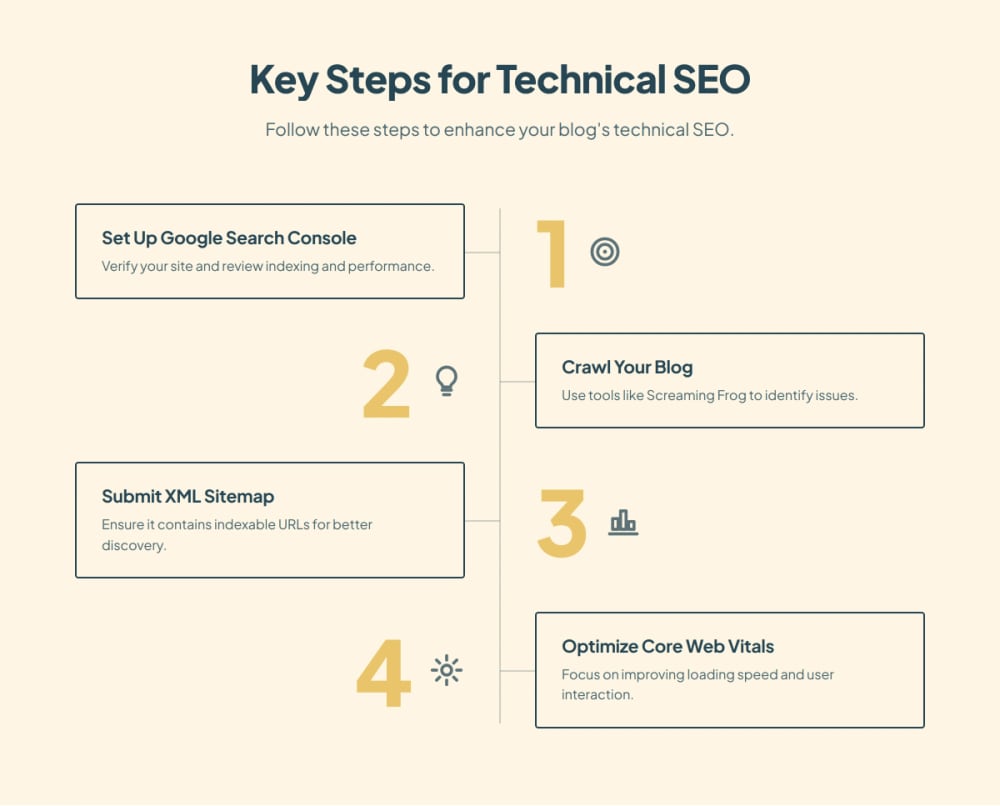
Test representative templates in PageSpeed Insights: a standard article, an image-heavy post, and a category page. Good Core Web Vitals thresholds are Largest Contentful Paint (LCP) at 2.5 seconds or less, Interaction to Next Paint (INP) at 200 milliseconds or less, and Cumulative Layout Shift (CLS) at 0.1 or less, measured at the 75th percentile of visits.
Field data reflects real users over a rolling 28-day period; low-traffic pages may lack sufficient data. Lighthouse lab tests help diagnose problems but do not replace field measurements or directly measure INP. Use Search Console to identify affected URL groups, then retest after fixes.
Upload appropriately sized, compressed images and use modern formats where supported. Reserve image dimensions to prevent layout shifts. Lazy-load below-the-fold images and embeds, but not the main image likely responsible for LCP. Replace heavy video players with click-to-load previews when practical.
Remove unused widgets, duplicate analytics, and unnecessary font weights. Ask a developer to investigate slow server responses, render-blocking resources, caching, and expensive JavaScript. Change one category at a time and test forms, consent tools, and analytics afterward.
Open posts on a real phone and use browser device emulation. Check readable text, tap targets, menus, forms, tables, and horizontal overflow. Confirm HTTPS works without certificate warnings or insecure embedded resources. Keep lead magnets accessible without covering the article on arrival; prefer inline offers or restrained prompts over obstructive mobile pop-ups.
Vote on the biggest challenge you face with technical SEO.
What is your biggest hurdle in technical SEO?
Give each post a distinct, descriptive title tag aligned with its actual topic. Write a useful meta description, recognizing that search engines may generate a different snippet. Use one clear article H1 and descriptive H2s and H3s to organize sections. Check rendered output: a CMS field label does not prove the correct HTML element appears.
Confirm that article text, headings, and navigation appear in rendered HTML, with internal links implemented as standard anchors with destinations. Use Search Console’s live test and rendered HTML where available, plus browser inspection. Important content should not depend on clicking a button, logging in, or scrolling to trigger an API request. Escalate missing rendered content to a developer.
Clear summaries, explicit definitions, author information, and supporting sources help people and machines interpret your work. These practices support AI search discoverability, but neither special wording nor structured markup guarantees citation. Access policies for individual AI crawlers are separate from Google indexing settings.
Use Article or BlogPosting markup that accurately reflects visible information, including the headline, author, images, and publication or modification dates. Add BreadcrumbList markup when it matches the navigation hierarchy. Check Google-supported features with the Rich Results Test and broader vocabulary with Schema Markup Validator. Resolve errors and conflicting template output; valid markup does not guarantee rich results, rankings, or AI visibility.
Before release, verify the slug, title, headings, canonical setting, image dimensions, mobile layout, and internal links. Immediately after publishing, confirm the live URL returns 200, permits indexing, appears in the sitemap, and has at least one relevant incoming internal link. For URL changes, test the old address’s redirect. Keep staging sites private.
Review Search Console notifications and indexing changes weekly. Run a monthly crawl and compare errors with your baseline. Recheck templates after redesigns, integrations, and CMS updates. Log release dates alongside traffic and indexing changes. Diagnose traffic drops by page, query, device, and timing before assuming a technical fault.
Use CMS automation for repeatable work such as sitemap updates, canonical generation, metadata defaults, and image handling where supported. Hyperblog’s blogging-focused CMS is designed to automate technical SEO and AEO tasks without requiring marketers to manage every implementation detail. Verify what your configuration produces rather than treating automation as a substitute for testing.
Escalate exceptions with the affected URL, expected behavior, observed result, screenshot or report, and date first noticed. Assign an owner and retest after deployment. The strongest technical SEO checklist is a repeatable workflow: publish confidently, monitor consistently, and fix problems before they spread.
Technical SEO refers to optimizing a website's infrastructure to help search engines crawl and index it effectively.
Regular audits, at least monthly, are recommended to maintain optimal SEO performance.
Tools like Google Search Console, Screaming Frog, and PageSpeed Insights are essential for technical SEO.
A sitemap helps search engines discover and index your pages, improving your site's visibility.
Core Web Vitals are metrics that measure user experience, focusing on loading performance, interactivity, and visual stability.
Subscribe to Our Newsletter
Stay up to date with our latest news and updates.